HR administrator
Use the employee leave workflow in WatheeqaHR to submit and review the request, then reconcile the approved booking with the employee’s balance. Keep the Word form as your organisation’s supporting document when needed.
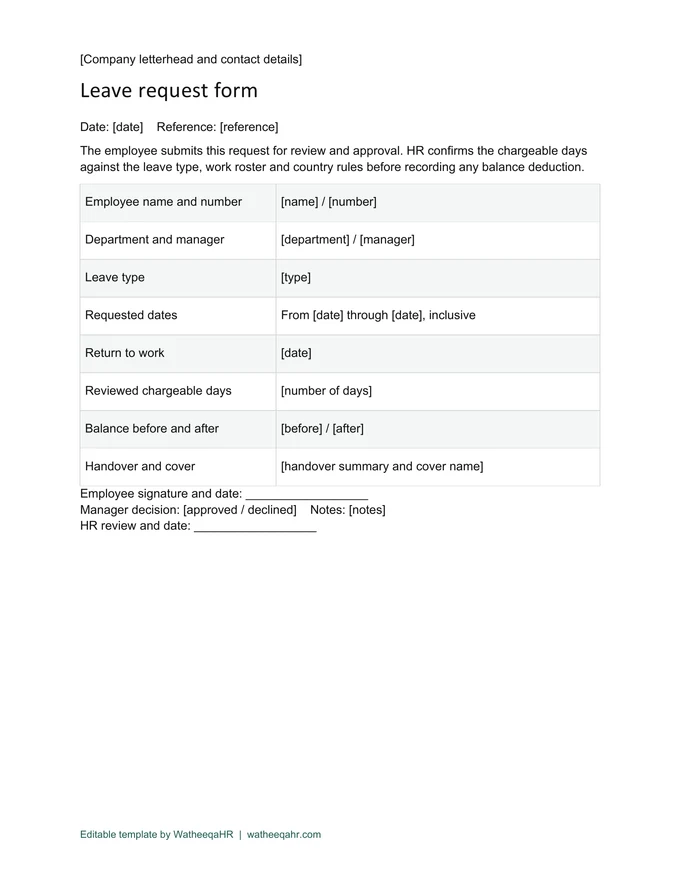
Download an editable leave request with employee, dates, leave type, handover, manager decision and HR balance review. Record the requested calendar range first, then confirm chargeable days under the applicable country rules and work schedule. The form records a request; the approval workflow determines the final booking.
Open the file in Word and save a named working copy before replacing the bracketed fields. Use the employer’s real details and letterhead.
Use the employee leave workflow in WatheeqaHR to submit and review the request, then reconcile the approved booking with the employee’s balance. Keep the Word form as your organisation’s supporting document when needed.
Check the name, dates, currency and amounts. Remove unused fields before authorisation, then retain the issued copy and the approval or payment reference where applicable.
| Feature | Description |
|---|---|
| Fields and approvals | Employee name/number, department, manager, leave type, inclusive start/end dates, return date, reviewed days, balance before/after, handover and cover, employee signature, manager decision and HR review. |
| Worked balance example | Illustrative approved booking: starting balance 18 days − reviewed chargeable leave 5 days = 13 days remaining. The five days are an assumed reviewed entitlement, not an instruction to count every country’s weekends and holidays the same way. |
| Dates and handover | State whether the last requested date is inclusive and record the planned return separately. Assign the covering colleague and outstanding tasks before approval. Keep medical details in the authorised private HR process rather than an openly circulated handover. |
Use the employee leave workflow in WatheeqaHR to submit and review the request, then reconcile the approved booking with the employee’s balance. Keep the Word form as your organisation’s supporting document when needed.
Use the employee leave workflow in WatheeqaHR to submit and review the request, then reconcile the approved booking with the employee’s balance. Keep the Word form as your organisation’s supporting document when needed.
The file is free without signup. Arabic and English editable versions are available, and the full product has a free 30-day trial.
Upload an Excel or CSV export and review the result free — no signup required.
Analyze attendance free Create free account