HR administrator
Review the employee profile and the approved salary ledger in WatheeqaHR, then fill and issue this document from the employer’s own letterhead. The download is an editable Word template.
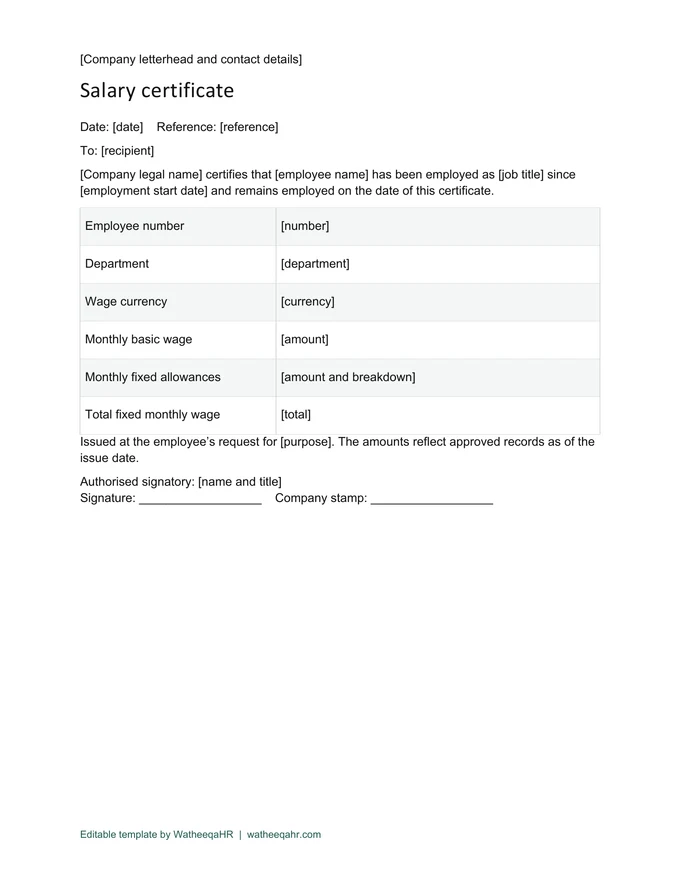
Download an editable salary certificate in English or Arabic. It records the employer, employee, start date, basic wage, fixed allowances and authorised signatory. Fill it from approved records, place it on company letterhead and check the recipient’s requirements before issuing it.
Open the file in Word and save a named working copy before replacing the bracketed fields. Use the employer’s real details and letterhead.
Review the employee profile and the approved salary ledger in WatheeqaHR, then fill and issue this document from the employer’s own letterhead. The download is an editable Word template.
Check the name, dates, currency and amounts. Remove unused fields before authorisation, then retain the issued copy and the approval or payment reference where applicable.
| Feature | Description |
|---|---|
| Fields in the certificate | Company legal name and contact details; issue date and reference; recipient and purpose; employee name, number, department and job; employment start date; currency, basic wage, fixed allowances and monthly total; authorised name, signature and stamp. |
| Salary certificate versus payslip | A salary certificate confirms employment and the stated fixed monthly wage as of an issue date. A payslip describes a particular payroll period, including additions, deductions and net pay. Choose the document the recipient actually requested. |
| Worked filling example | Illustrative amounts only: AED 5,000 basic wage + AED 1,000 fixed allowances = AED 6,000 fixed monthly wage. A one-off bonus is not silently included as a recurring allowance. Reconcile the three fields before the authorised person signs. |
Review the employee profile and the approved salary ledger in WatheeqaHR, then fill and issue this document from the employer’s own letterhead. The download is an editable Word template.
Review the employee profile and the approved salary ledger in WatheeqaHR, then fill and issue this document from the employer’s own letterhead. The download is an editable Word template.
The file is free without signup. Arabic and English editable versions are available, and the full product has a free 30-day trial.
Upload an Excel or CSV export and review the result free — no signup required.
Analyze attendance free Create free account